How the Elmo account hack exposes key social media security failings and steps you can take to safeguard your own accounts
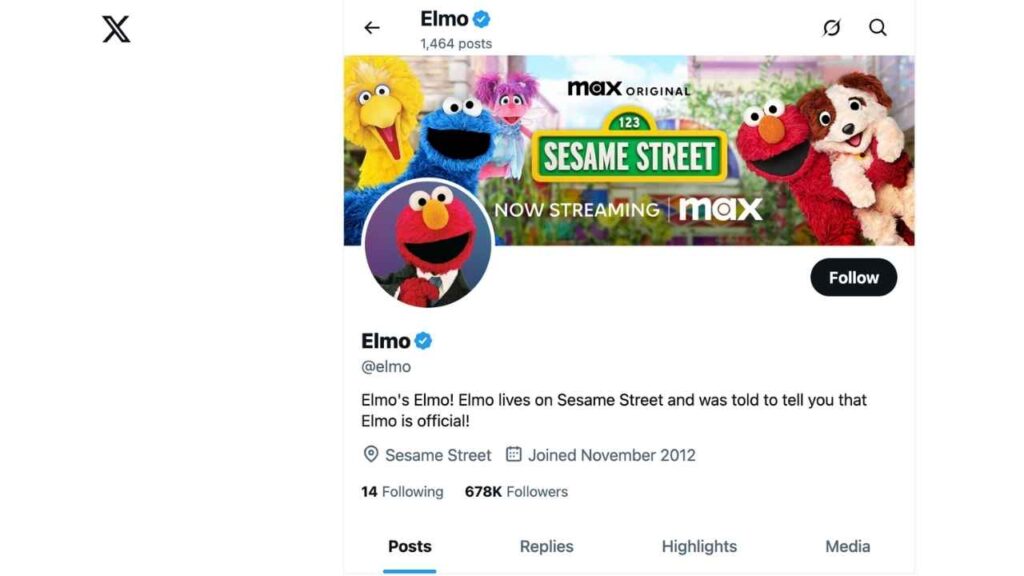
As you scroll through X (formerly Twitter), you might come across Elmo, the lovable red monster cherished by children and parents, sharing cheerful, family-friendly content. However, recently, the official Elmo account had suddenly posted hate speech, racist slurs, and political attacks. This shocking breach transformed a beloved feed into a source of confusion and pain.
Sesame Workshop, the team behind Elmo, acted swiftly to remove the offensive posts, but for millions of fans, the damage had already been done. This was far more than a typical hack. It represented the digital defacement of one of the world’s most trusted childhood icons. This incident underscores that in today’s cyber landscape, no account, not even the most seemingly secure one, is immune to attackers.
Social media cybersecurity risks for trusted brands
Hackers crave reach and attention, and few targets offer more than a beloved global brand. When attackers seize control of an account with hundreds of thousands of followers, they gain immediate access to amplify their message, whether it be misinformation, hate speech, or targeted harassment. The Elmo incident wasn’t about stealing data or ransoming accounts; this was about causing chaos, sowing division, and breaking trust.
For years, Elmo’s online voice was synonymous with joy and support. With a single breach, that reputation was battered, as followers questioned how such ugliness could appear from a character so trusted. Brand reputation, built over decades, was compromised in minutes.
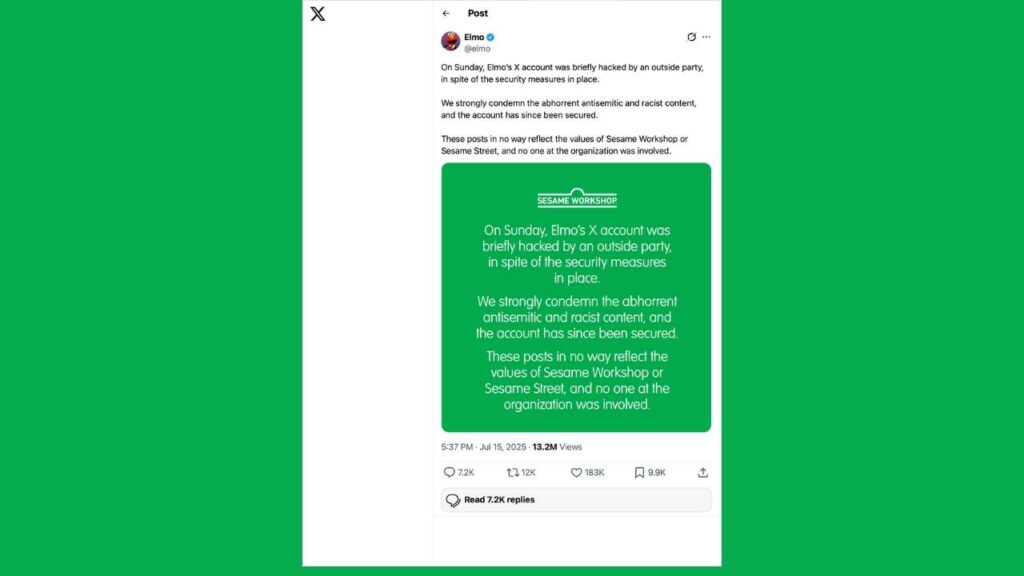
As Sesame Workshop stated in response:
“Elmo’s X account was briefly hacked by an outside party, in spite of the security measures in place. We strongly condemn the abhorrent antisemitic and racist content, and the account has since been secured. These posts in no way reflect the values of Sesame Workshop or Sesame Street, and no one at the organization was involved.”
This incident underscores the importance of robust cybersecurity measures, especially when trusted brands serve as platforms for millions worldwide.
Why social media accounts get hacked (even with “strong” security)
To better understand what happened, we turned to Daniel Tobok, CEO of CYPFER, a leading global cybersecurity and incident response firm. Daniel has spent over 30 years guiding organizations through major cyber events.
“Unfortunately, a lot of credentials are harvested and sold on the dark web between different threat actor groups despite strong passwords or MFA barriers. Maybe someone lost their password, or an administrator had theirs saved on a laptop that was part of another breach. Once those passwords are collected, they get traded or sold,” Daniel explains.
While brute-force attacks still happen, most criminals don’t waste time hammering away at complex passwords. Instead, they exploit simpler routes: snatching passwords from old breaches, targeting users directly, or hijacking password vaults, especially those managed by social media admins.
“Brute-force attacks make a lot of noise and can trigger alerts. It’s not the most popular strategy anymore because it’s so noisy,” Daniel adds.
Warning signs your social media account may be hacked
Unfortunately, you might not get a warning that your account is being targeted. Daniel Tobok points out:
“There really isn’t public-facing software that notifies you. Sometimes, you might get an email saying, ‘We noticed unusual activity. Was this you?’ That typically comes through MFA channels. But most executives don’t manage their own social media accounts. It’s usually someone on their team or a designated admin. So, if something goes wrong, they’re not necessarily the ones who will see it.”
Hackers can even set up rules that reroute security notifications away from your inbox, leaving you completely unaware that anything’s wrong, until it’s too late.
Common social media security mistakes to avoid
Hackers are counting on you to get complacent. Daniel calls out pitfalls to avoid:
- Not verifying your account
- Reusing or failing to rotate passwords
- Skipping MFA (multi-factor authentication)
- Assuming “it won’t happen to us”
- Most alarmingly, Daniel adds:
“Most people’s information has already been compromised at some point. There are over 4.8 billion passwords circulating on the dark web right now. And finally, never reuse the same password across multiple platforms. I know it’s tedious, but that’s what proper hygiene looks like.”

What to do if your social media is compromised
Act fast. Here’s Daniel’s step-by-step plan:
“If you still have access, change your password right away. Most threat actors, once they’re in, will immediately change the password and the email linked to the account so they can take full control. If you’re locked out, you need to contact the platform and provide proof that it’s your account. Request that they shut it down or help you recover it. The good news is, most platforms will act quickly, especially if you tell them someone is posting offensive or racist content from your account.”
Key steps to protect your social media accounts
Protecting your social media accounts is more important than ever. Follow these steps to strengthen your cybersecurity and keep hackers out:
1) Use strong, unique passwords
Create passwords with at least nine characters, mixing uppercase, lowercase, numbers, and symbols. Never reuse passwords across platforms, and update them regularly for maximum protection. Consider using a password manager, which securely stores and generates complex passwords, reducing the risk of password reuse. Also, use a password manager instead of sending passwords through unencrypted messages. Password managers allow you to securely share credentials when absolutely necessary and help prevent leaks.
One of the best password managers out there is NordPass. It is secure, user-friendly, and uses zero-knowledge architecture with military-grade XChaCha20 encryption to protect your data. NordPass works across Windows, macOS, Linux, Android, iOS, and major browsers and includes features like:
- Unlimited password storage
- Secure sharing
- Password health reports
- Auto-fill and emergency access
- Data breach monitoring to alert you if your credentials have been exposed
- A Security Dashboard with tools like the Data Breach Scanner and Password Health Checker to identify weak, reused, or compromised passwords
Use NordPass to check if your email or passwords have shown up in known data breaches, and take immediate action if they have.
2) Enable multi-factor authentication (MFA)
Always activate MFA to add an extra layer of login protection. This makes it much harder for unauthorized users to gain access, even if your password is compromised.
3) Set up suspicious login activity alerts
Take advantage of account alerts and limit unsuccessful login attempts to detect intruders quickly. Regularly review these alerts so you can respond immediately if something looks off.
4) Verify your accounts with the platform
Apply for official account verification when possible to add an extra safeguard and make recovery easier. Verification can also deter impersonation and build trust with your audience.
5) Update account recovery information
Check and keep your recovery email and phone number current to regain access if needed. Outdated information could lock you out just when you need to recover your account the most.
6) Review third-party app access
Remove apps or services you no longer use; these can become weak points if they are compromised. Regularly audit connected apps to ensure your data isn’t exposed through unused integrations.
7) Back up your content and followers
Use platform features or trusted tools to back up important data in case of account loss or lockout. This simple step can be a lifesaver if you ever lose access or your data is accidentally deleted.
8) Use strong antivirus software
Install strong antivirus software on all devices used to access social media. Regular updates and real-time scanning protect you from malware, and phishing that could compromise your accounts. The best way to safeguard yourself from malicious links that install malware, potentially accessing your private information, is to have antivirus software installed on all your devices. This protection can also alert you to phishing emails and ransomware scams, keeping your personal information and digital assets safe.
My top pick is TotalAV.
TotalAV is easy to set up and offers real-time protection for paid users, keeping your devices safe around the clock. It includes tools to block phishing scams, remove ransomware and spyware, and clean up adware and junk files. The software also features a browser manager, system tune-up tools, and protects across Windows, Mac, Android, and iOS devices.
9) Consider a data removal service
Reduce your digital footprint and minimize risk by using services that remove your personal information from data brokers and people-search sites, especially after a breach. These services make it harder for criminals to gather sensitive data used in social engineering attacks. While no service can guarantee the complete removal of your data from the internet, a data removal service is really a smart choice. They aren’t cheap – and neither is your privacy. These services do all the work for you by actively monitoring and systematically erasing your personal information from hundreds of websites. It’s what gives me peace of mind and has proven to be the most effective way to erase your personal data from the internet. By limiting the information available, you reduce the risk of scammers cross-referencing data from breaches with information they might find on the dark web, making it harder for them to target you.
A service like Incogni can help you remove all this personal information from the internet. It has a very clean interface and will scan 250+ websites for your information and remove it and keep it removed.
The longer you wait, the more data brokers spread your personal information online. I recommend Incogni to help you remove that data automatically (and they make sure it stays removed) without any effort on your part.
10) Perform regular security settings audits
Periodically review your social media privacy and security settings to ensure they match your current needs. Platforms often add new settings and features-staying up to date gives you the best protection.
11) Be cautious using public Wi-Fi
Avoid logging into accounts on public Wi-Fi, or always use a VPN. Public networks make it easier for hackers to intercept your information.
ExpressVPN – Best for Speed & Security
ExpressVPN is the go-to choice for those who prioritize ultra-fast speeds, reliability, and top-tier security. With servers in 105 countries, ExpressVPN delivers blazing-fast performance for streaming, gaming, and secure browsing. It supports P2P file sharing, offers best-in-class encryption, and maintains a strict no-logs policy—with all servers running on RAM for enhanced privacy. You can connect up to 8 devices simultaneously, and setup takes under 2 minutes. Plus, with 24/7 live customer support and a 30-day money-back guarantee, ExpressVPN is a premium choice for security-focused users who want speed without compromise.
12) Promptly remove former employees or admins
Regularly audit account access and revoke permissions for anyone who no longer needs it. This ensures that only trusted individuals can post or make changes on your behalf.
Related Links:
- How AI chatbots are helping hackers target your banking accounts
- Windows 11 flaw lets hackers bypass Secure Boot protections
- Is your phone hacked? How to tell and what to do
Key takeaways
The Elmo hack shattered more than just a cheerful digital persona. It reminded us that no brand, no matter how trusted, is immune to today’s cyber threats. In an environment where trust is built tweet by tweet and lost in mere moments. Protecting our digital presence has never been more urgent. Social media security is everyone’s responsibility. Take action before you become the next viral lesson in what not to do.
Your Complete Cyber Security Partner:
Elke stap, elke dreiging.



At CYPFER, we don’t just protect your business—we become part of it.
Als uitbreiding van je team ligt onze focus exclusief op cybersecurity, voor jouw gemoedsrust. Van incidentenrespons en ransomwareherstel tot digitaal forensisch onderzoek en cyberrisico’s, wij integreren naadloos met je bedrijfsactiviteiten. We staan 24 uur per dag, 7 dagen per week voor je klaar om dreigingen de kop in te drukken en ze voor de toekomst te voorkomen.
Als je voor CYPFER kiest, ervaar je ongeëvenaarde toewijding en expertise. Vertrouw op ons om je bedrijf te allen tijde veilig en weerbaar te houden.
Ga vandaag nog voor Cyber Certainty™
Wij zorgen dat het hart van je bedrijf blijft kloppen en beschermen je tegen cyberaanvallen. Waar je ook bent, wat de situatie ook is.
Neem vandaag nog contact op met CYPFER